
Cairn Money Models №1 · for men who run the numbers
The Runway Workbook
Your next 12 months of cash, one number at a time.
Your support number is set; this shows what it does to the rest. One macro-free Excel workbook: a daily 12-month runway of your real cash — support out every pay, two households on one income, the day you'd cross your cushion, and the one number most men guess at, the maximum safe spend per pay. You were going to build this yourself, three weekends from now. It's built, and the formulas are verified.
vs three weekends building it yourself. One-time download · Excel workbook (.xlsx) · macro-free · works offline.
Proof, not promises
This is the file itself, not a mock-up.
The workbook opens with realistic example data, so every page demos itself before you type a number. In the example: biweekly pay, rent, support, a line of credit — and a $3,500 retainer landing in August.
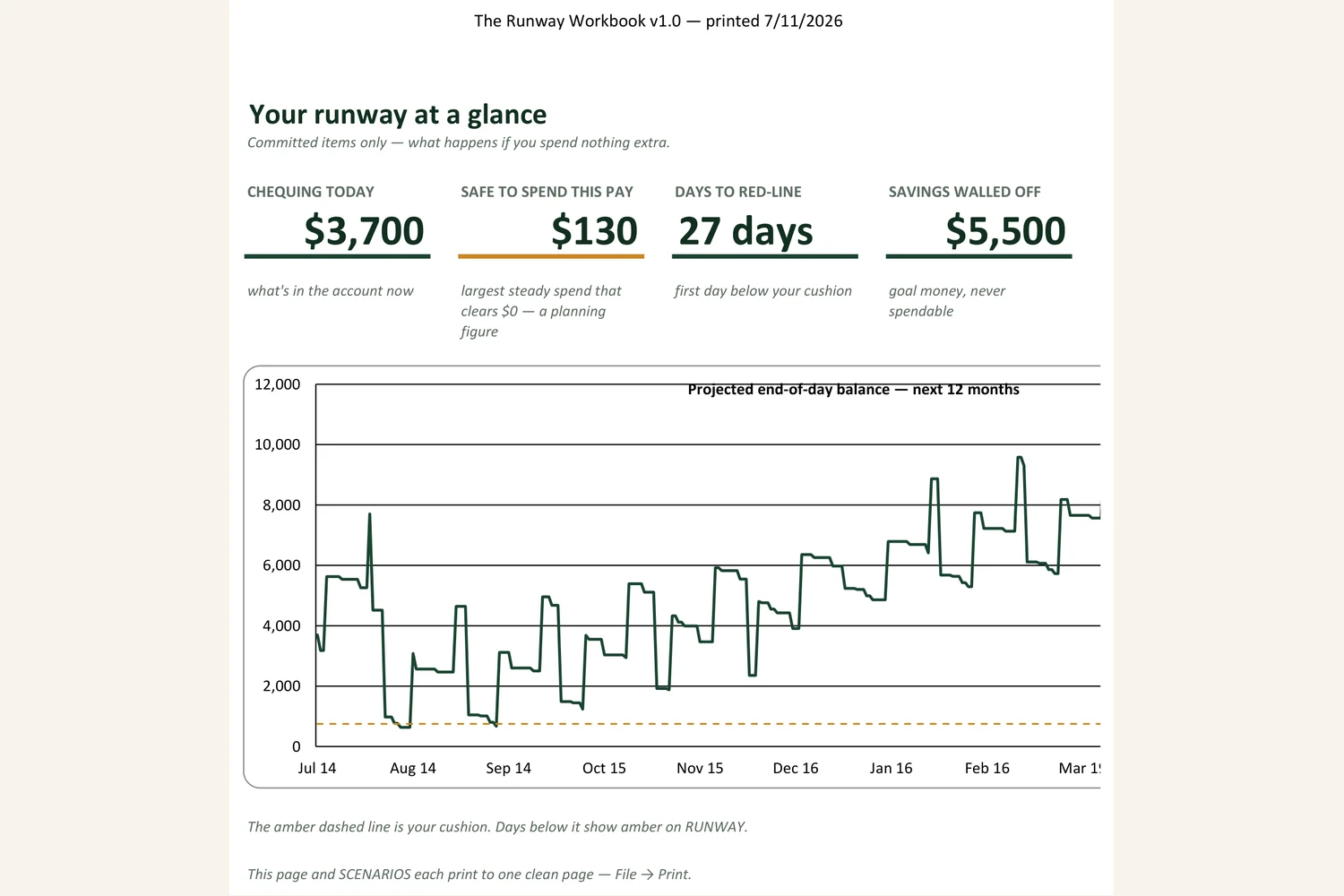
Spend $300 a pay instead and the model shows the exact day the balance goes negative. That is the whole product: not a budget lecture — the day, the amount, and the number that clears.
Check the work
Every formula open. Every rule cited. Nothing password-locked.
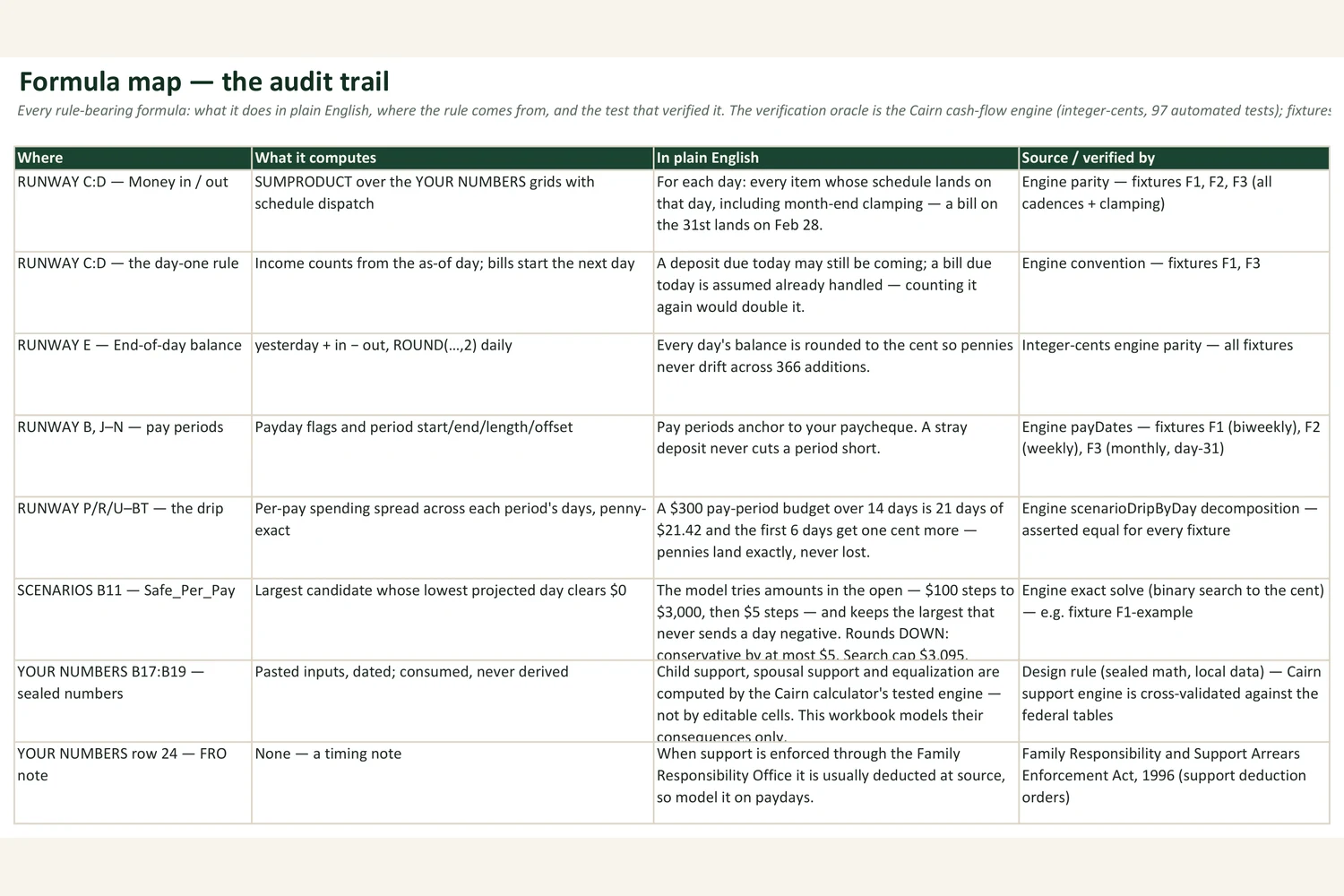
The FORMULA MAP tab names every rule-bearing formula with its plain-English meaning, its source, and the test that verified it. Every projected balance is matched to the cent against a separate cash-flow engine carrying 97 automated tests — three full scenarios, 366 days each. Step one on the START tab is literally "check the work."
Sealed math, local data
It never recomputes your support number. That's the point.
Support and equalization figures are legal numbers. They come from the free Cairn calculator — a tested, cross-validated engine — and you paste them in, dated. The workbook models their consequences: what lives in editable cells is arithmetic whose worst failure is a visibly wrong balance, never a mispriced legal obligation.
- The free calculator computes the legal number.
- This workbook shows what the number does to your year — and what's safe to spend.
- A licensed professional tells you what to do about it. The workbook makes that conversation shorter.
What is inside
Nine tabs. One job: what's safe to spend.
- 1
START
Ten steps, about ten minutes — each with the why. The privacy paragraph and the version banner live here.
- 2
DASHBOARD
Four numbers and a 12-month line. The hero is Safe to spend this pay.
- 3
YOUR NUMBERS
Every input on one tab: balances, cushion, pay, your pasted support numbers (dated), the bills grid, one-time events.
- 4
RUNWAY
Every day for twelve months: projected end-of-day balances, with the red-line flagged before any day dips below your cushion.
- 5
SCENARIOS
Committed-only vs your amount vs the maximum safe spend — totals, weekly averages, and the first day each model goes red.
- 6
GOALS & DEBTS
Savings goals walled off from spendable; per-debt payoff schedules with dates.
- 7
WHY MODELS DIFFER
Why your sheet, a lawyer's software, and a bank app can all show different numbers — and which to use for what.
- 8
FORMULA MAP
Every rule-bearing formula: plain-English meaning, source, and the test that verified it.
- 9
NEXT & RESET
Updates, the 60-second reset, support and refunds.
Three weekends of building it yourself, done and verified.
One-time. Yours to keep. Full refund within 14 days if it does not help — no forms.
The maintenance promise
You get every 1.x update free — we refresh the workbook's dated assumptions annually and fix anything broken. The file is yours forever and works offline forever; the math in it doesn't expire, and the sheet itself tells you when a pasted number is old enough to re-check.
Macro-free. No accounts, no connections — nothing leaves your machine. v1.0 · assumptions dated 2026-07.
Where it runs
- Excel 2019+ / Microsoft 365 (Windows or Mac) — the design target. Fully supported and QA'd each release.
- Google Sheets — imports and works, with minor rendering differences noted on the START tab.
- LibreOffice / Numbers — best effort. If it does not work on your setup, the refund applies.
Questions men ask first
Before you buy.
Changelog
- v1.0 — July 2026. First release. Assumptions dated 2026-07. Verified against fixture scenarios F1–F3.
Tired of retyping transactions?
A Cairn cash-flow app is in the works: it runs this same model automatically — drag in your bank's export file and it re-baselines itself, with your data still never leaving your machine. Workbook owners are the waitlist: updates go to the email on your purchase, and owners get first access.
Questions or ideas for it? Email info@cairnguide.ca.
This workbook is a budgeting aid — general information and arithmetic, not legal or financial advice. For what the numbers mean in your case, talk to a licensed Ontario professional. Cairn · cairnguide.ca. The information applies to Ontario.